Archive for the ‘Uncategorized’ Category

NirLauncher package now has a Web site – http://launcher.nirsoft.net/

Monday, January 4th, 2010

NirLauncher is a package of more than 100 utilities of  NirSoft Web site with a launcher application that allows you to easily find and launch the desired utility or its help file.
A few months ago, I released the first Beta of this package in this Blog, and finally, now NirLauncher has a separated Web site with the latest package available to download.

The Web site address of  NirLauncher Web site is http://launcher.nirsoft.net/

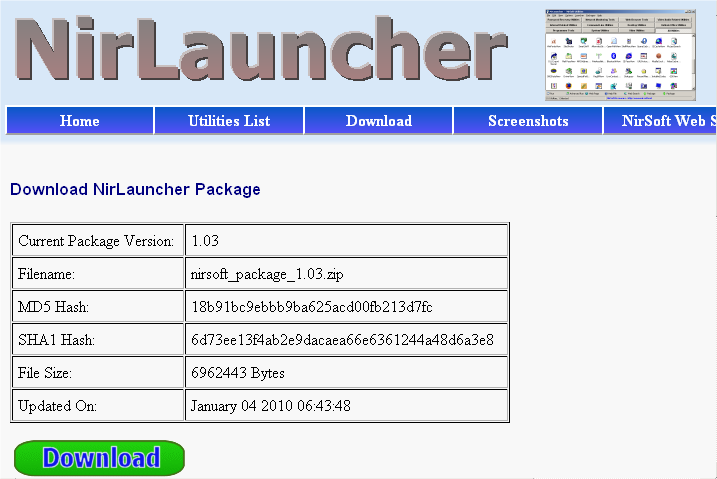
Starting from today, NirLauncher package will also be updated more frequently than before. The latest version and the last update date are automatically displayed in the download page, so you'll be able to easily see when there is a new package to download.
There is a new update from today, which includes all utilities changes made since the last NirLauncher release and the new FlashCookiesView utility. There is also a small improvement in NirLauncher application - it now allows you to launch the selected utility simply by pressing the Enter key. You can also change the functionality of Enter key in 'Advanced Options' window.

NirLauncher Download Page

NirLauncher Download Page

NirLauncher release in Web site traffic statistics

Sunday, October 11th, 2009

Just a week ago, I released the first Beta of NirLauncher package to download from this Blog.  For the beginning, I deliberately released this package quietly only in my Blog, and added some download restrictions, because this package is relatively large, and I wanted to make sure that my server won't be overloaded by large amount of users that download this package in the same time.  even with this "quiet" release and these download restrictions, I still got a large peak of users that downloaded the Beta release of NirLauncher.

A day after I released this package, it was published in lifehacker and other well-known Web sites, which caused a large visitors peak that I had never seen before. At some point, my server load was pretty high, due to large amount of users that downloaded this package concurrently.

The users pick that I got after the NirLauncher release can be easily seen in the site statistics of Google Analitics.  On October 5th, the number of unique visitors reached to nearly 50,000,  which is around 40% more than a usual day.
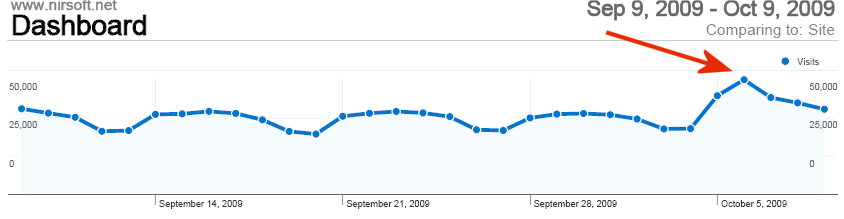
NirLauncher release in Google Analitics.

NirLauncher release in Google Analitics.

On alexa Web site, you can also see the visitors peak after NirLauncher release, but the visitors peak is not sharp as in Google Analitics, because there are other peaks appeared during september, from unknown reason. Obviously, Google Analitics is more accurate than Alexa, because Alexa only counts the visitors with Alexa toolbar, while Google Analitics counts all visitors with JavaScript enabled Web browser.
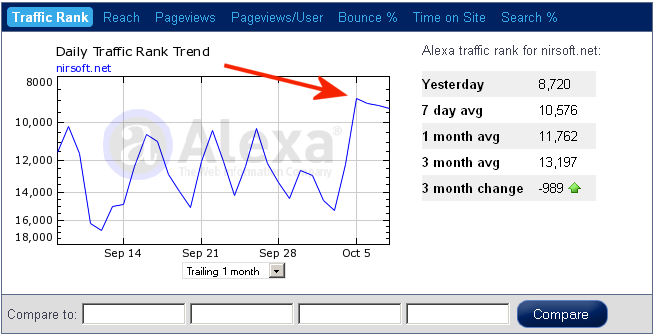
NirLauncher release in Alexa

NirLauncher release in Alexa

Another impressive result from NirLauncher release is the number of remarks in the release post (currently 55), which is quite nice relatively to my inactive Blog.  Be aware that I haven't had time yet to read all yours remarks deeply, but I'll certainly consider them in further NirLauncher releases.
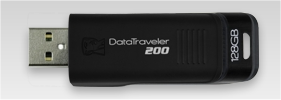
128 GB flash drive from Kingston

Wednesday, June 24th, 2009

In my previous post, I said that the largest available flash drive is 64 GB.
So I discovered that I was wrong, Because just a week ago, Kingston announced about the first 128 GB flash drive in the market.

If you are really a millionaire that want to waste your money, you can purchase this flash drive in a special price of $1065 at Amazon.

If you are not a millionaire, wait 2 years, and then you'll be able to purchase the same flash drive in less than 10% of the price that it's sold today.
In that time, we'll probably see the first 512 GB or even 1 TB flash drives in the market.

Utilities update for Windows 7 and x64 systems.

Wednesday, June 3rd, 2009

3 of my utilities that stopped working under Windows 7 - RegFromApp, ProcessActivityView, and SocketSniff, are now fixed and works properly with Windows 7.
These utilities failed to work with Windows 7 due to some changes made in Windows 7 kernel, and you can read more about these kernel changes, here.

In addition to the updates for Windows 7, I also added x64 downloads for RegFromApp, ProcessActivityView, and RunAsDate utilities.

NirSoft utilities on Windows 7 Beta

Saturday, January 10th, 2009

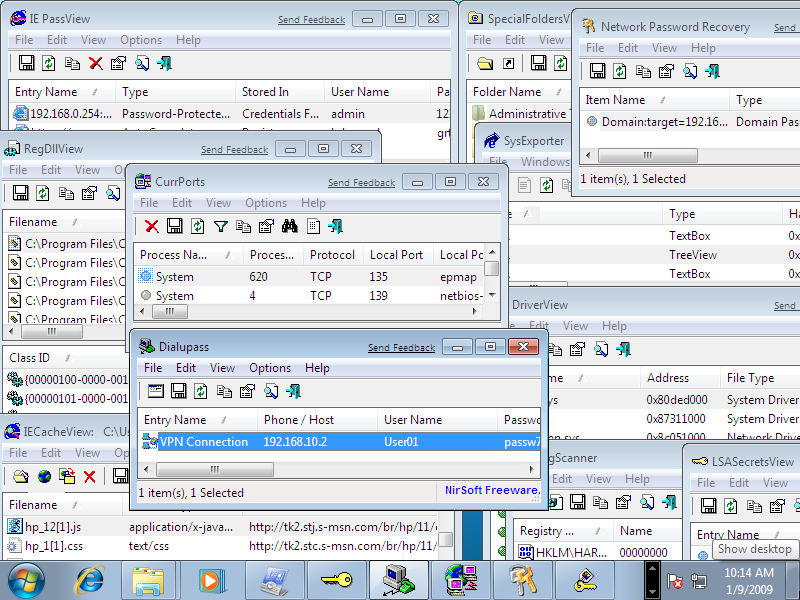
I just tested a few of my utilities on Windows 7 Beta.

The test included IE PassView, IECacheView, Network Password Recovery, SysExporter, RegScanner, Dialupass, CurrPorts, DriverView, LSASecretsView, and more.
It seems that all tested utilities work fine under Windows 7, as you can see in the following screenshot:

nirsoft.net statistics: Almost 30% of visitors use Firefox Web browser.

Thursday, January 1st, 2009

Since I started to collect general statistics about Web browser usage of nirsoft.net, 4 years ago, there was a gradual increase in usage of Firefox, while the usage of Internet Explorer gradually decreased.
According to statistics of the last month (December 2008), 29.2% of nirsoft.net visitors use Firefox as thier Web browser, while 55.8% of visitors use Internet Explorer.

For more nirsoft.net statistics, click here.

Saved Password Locations

Monday, November 24th, 2008

Many people ask me about the location in the Registry or file system that applications store the passwords. So I prepared a list of password storage locations for popular applications.
Be aware that even if you know the location of the saved password, it doesn't mean that you can move it from one computer to another. many applications store the passwords in a way that prevent you from moving them to another computer or user profile.

  • Internet Explorer 4.00 - 6.00: The passwords are stored in a secret location in the Registry known as the "Protected Storage".
    The base key of the Protected Storage is located under the following key:
    "HKEY_CURRENT_USER\Software\Microsoft\Protected Storage System Provider".
    You can browse the above key in the Registry Editor (RegEdit), but you won't be able to watch the passwords, because they are encrypted.
    Also, this key cannot easily moved from one computer to another, like you do with regular Registry keys.

    IE PassView and Protected Storage PassView utilities allow you to recover these passwords.

  • Internet Explorer 7.00 - 8.00: The new versions of Internet Explorer stores the passwords in 2 different locations.
    AutoComplete passwords are stored in the Registry under HKEY_CURRENT_USER\Software\Microsoft\Internet Explorer\IntelliForms\Storage2.
    HTTP Authentication passwords are stored in the Credentials file under Documents and Settings\Application Data\Microsoft\Credentials , together with login passwords of LAN computers and other passwords.

    IE PassView can be used to recover these passwords.

  • Firefox: The passwords are stored in one of the following filenames: signons.txt, signons2.txt, and signons3.txt (depends on Firefox version)
    These password files are located inside the profile folder of Firefox, in [Windows Profile]\Application Data\Mozilla\Firefox\Profiles\[Profile Name]
    Also, key3.db, located in the same folder, is used for encryption/decription of the passwords.
  • Google Chrome Web browser: The passwords are stored in [Windows Profile]\Local Settings\Application Data\Google\Chrome\User Data\Default\Web Data
    (This filename is SQLite database which contains encrypted passwords and other stuff)
  • Opera: The passwords are stored in wand.dat filename, located under [Windows Profile]\Application Data\Opera\Opera\profile
  • Outlook Express (All Versions): The POP3/SMTP/IMAP passwords Outlook Express are also stored in the Protected Storage, like the passwords of old versions of Internet Explorer.

    Both Mail PassView and Protected Storage PassView utilities can recover these passwords.

  • Outlook 98/2000: Old versions of Outlook stored the POP3/SMTP/IMAP passwords in the Protected Storage, like the passwords of old versions of Internet Explorer.

    Both Mail PassView and Protected Storage PassView utilities can recover these passwords.

  • Outlook 2002-2008: All new versions of Outlook store the passwords in the same Registry key of the account settings.
    The accounts are stored in the Registry under HKEY_CURRENT_USER\Microsoft\Windows NT\CurrentVersion\Windows Messaging Subsystem\Profiles\[Profile Name]\9375CFF0413111d3B88A00104B2A6676\[Account Index]
    If you use Outlook to connect an account on Exchange server, the password is stored in the Credentials file, together with login passwords of LAN computers.

    Mail PassView can be used to recover lost passwords of Outlook 2002-2008.

  • Windows Live Mail: All account settings, including the encrypted passwords, are stored in [Windows Profile]\Local Settings\Application Data\Microsoft\Windows Live Mail\[Account Name]
    The account filename is an xml file with .oeaccount extension.

    Mail PassView can be used to recover lost passwords of Windows Live Mail.

  • ThunderBird: The password file is located under [Windows Profile]\Application Data\Thunderbird\Profiles\[Profile Name]
    You should search a filename with .s extension.
  • Google Talk: All account settings, including the encrypted passwords, are stored in the Registry under HKEY_CURRENT_USER\Software\Google\Google Talk\Accounts\[Account Name]
  • Google Desktop: Email passwords are stored in the Registry under HKEY_CURRENT_USER\Software\Google\Google Desktop\Mailboxes\[Account Name]
  • MSN/Windows Messenger version 6.x and below: The passwords are stored in one of the following locations:
    1. Registry Key: HKEY_CURRENT_USER\Software\Microsoft\MSNMessenger
    2. Registry Key: HKEY_CURRENT_USER\Software\Microsoft\MessengerService
    3. In the Credentials file, with entry named as "Passport.Net\\*". (Only when the OS is XP or more)
  • MSN Messenger version 7.x: The passwords are stored under HKEY_CURRENT_USER\Software\Microsoft\IdentityCRL\Creds\[Account Name]
  • Windows Live Messenger version 8.x/9.x: The passwords are stored in the Credentials file, with entry name begins with "WindowsLive:name=".

    These passwords can be recovered by both Network Password Recovery and MessenPass utilities.

  • Yahoo Messenger 6.x: The password is stored in the Registry, under HKEY_CURRENT_USER\Software\Yahoo\Pager
    ("EOptions string" value)
  • Yahoo Messenger 7.5 or later: The password is stored in the Registry, under HKEY_CURRENT_USER\Software\Yahoo\Pager - "ETS" value.
    The value stored in "ETS" value cannot be recovered back to the original password.
  • AIM Pro: The passwords are stored in the Registry, under HKEY_CURRENT_USER\Software\AIM\AIMPRO\[Account Name]
  • AIM 6.x: The passwords are stored in the Registry, under HKEY_CURRENT_USER\Software\America Online\AIM6\Passwords
  • ICQ Lite 4.x/5.x/2003: The passwords are stored in the Registry, under HKEY_CURRENT_USER\Software\Mirabilis\ICQ\NewOwners\[ICQ Number]
    (MainLocation value)
  • ICQ 6.x: The password hash is stored in [Windows Profile]\Application Data\ICQ\[User Name]\Owner.mdb (Access Database)
    (The password hash cannot be recovered back to the original password)
  • Digsby: The main password of Digsby is stored in [Windows Profile]\Application Data\Digsby\digsby.dat
    All other passwords are stored in Digsby servers.
  • PaltalkScene: The passwords are stored in the Registry, under HKEY_CURRENT_USER\Software\Paltalk\[Account Name].

Latest Utilities Changes

Thursday, October 30th, 2008

Here's a small summary of latest changes in NirSoft utilities:

  • MozillaCacheView and OperaCacheView: New option in 'Copy Selected Files To...': Save the files in the directory structure of the Web site.
  • USBDeview: Added new option - Open In RegEdit.
  • ShellExView: New restriction - ShellExView won't allow you to disable at once more than 15 shell extensions created by Microsoft.
  • PasswordFox: Added support for specifying the master password (in the 'Select Folders' dialog-box or from command-line).
  • SiteShoter: Added new option: 'Take a screenshot of this Web page every...'

Windows search puppy goes to sleep

Wednesday, October 8th, 2008

If you work on Windows XP, you probably already familiar with the animated search puppy that show its unessential tricks while you make a search. However, this puppy has a small "feature" that many people don't know about.
If you make a search, and then leave the search window opened without touching it for a long time, the search puppy get tired and goes to sleep....

Good Night !

Bug in IE8 transition effect

Sunday, October 5th, 2008

It seems that there is a weird bug in beta 2 release of Internet Explorer 8.
When browsing into the main page of NirSoft Web site, the transition effect stops in the middle of the transition process, and the user may think that the Web browser just hang. However, after resizing the window a little, everything returns back to normal.

Here's an example of how my site may look when browsing it with IE8: