LANIPScanner is a new tool for Windows that scans your network and displays the list of all computers and devices that are currently connected to your network. LANIPScanner uses multiple network protocols to scan your network, including ICMP (ping), ARP, mDNS, DNS, NBNS, SSDP.
For every computer or device that is connected to your network, the following information is displayed (Only if it’s available): IP Address, MAC Address, MAC Address Company, Device Name, Workgroup, Device String, Ping Time, Ping TTL, Device Type, Protocols List, IPv6 Address, IPv6 Link Local Address.
When a device responses to SSDP or mDNS protocol, you can also view the raw data received from the device in the lower pane, by selecting the device in the upper pane.
The LANIPScanner tool works on any version of Windows starting from Windows XP and up to Windows 11. Both 32-bit and 64-bit systems are supported.
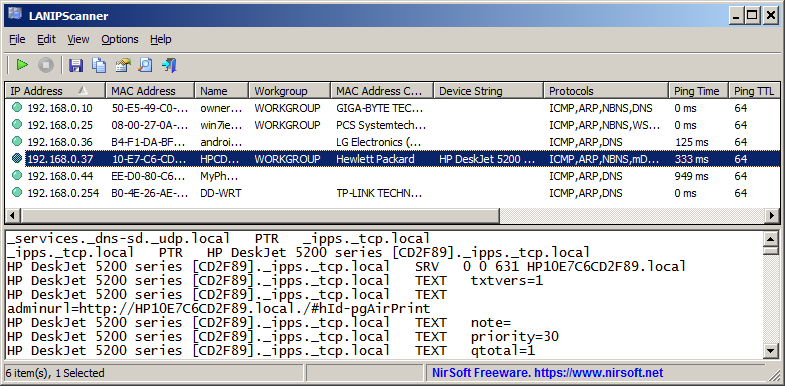
You can download the new LANIPScanner tool from this Web page.

Xander says:
Just wanted to drop a line and say that I’ve been using a lot of your tools daily for years and am constantly amazed that they do things SO much better than the canned M$ crap or have no solution for. Keep up the great work. Love everything you do.
February 2, 2026, 12:09 pmJesse says:
Your utilities and excellent and they are free. Nirsoft is one of the best things of the 21st century.
Please tell me how to use SearchMyFiles to find a folder. I check “Find Folders” and put a folder name in the various wildcard forms, with and without asterisks, and I fail to find my folder.
February 15, 2026, 9:07 amJörg Müller says:
A great tool – it saves me from having to open the Fritz!Box interface every time I want to start a remote computer. Thank you so much!
I have a suggestion/idea:
How about being able to mark favorites for individual devices (e.g., the ones I access most often) and list them in a separate view? This would save a bit of daily scrolling when dealing with many network devices. Perhaps even with a button in the row to start that device?
Maybe it would also be possible to create a shortcut or a small script for this tool, so that I could trigger the startup directly from the desktop? However, I lack the technical expertise for that (I’m just a regular user).
March 20, 2026, 10:23 am