Wireless Network Watcher is a new utility that scans your wireless network and displays the list of all computers and devices that are currently connected to your network.
For every computer or device that is connected to your network, the following information is displayed: IP address, MAC address, the company that manufactured the network card, and optionally the computer name.
You can also export the connected devices list into html/xml/csv/text file, or copy the list to the clipboard and then paste into Excel or other spreadsheet application.
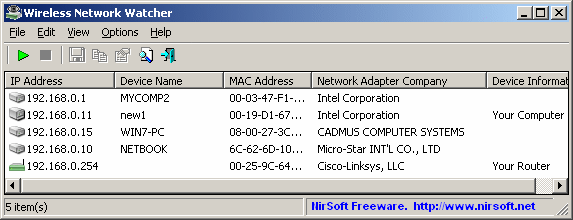
Wireless Network Watcher
You can download this new utility from this Web page.

TKG says:
Very vool utility! But for some reason it doesnt show my Android when connected to my Wifi Router.
Any idea why?
Greetz!
July 12, 2011, 12:41 pmwinny says:
The utility seems to be sending our arp requests so works on lan as well as wireless. It also finds my blackberry ok.
@tkg : My BB seems to connect when it feels like it, its not a constant connection, so it might explain why it missed your Android if it works the same way. Try doing a scan while using the browser.
July 26, 2011, 6:17 amDan Blum says:
I installed the new 1.1 version. On 1.0 my iPAD and iPod weren’t found. Initially, I thought 1.1t was no different, but I did further experimenting. If my Apple iPad was actively transmitting data (eg: visibly loading a web page at the very moment I clicked your scan button), the iPad IP address displayed in the list. However, if my iPad was only on, connected via WiFi to the router, but SEEMINGLY not actively transmitting or receiving, it did not show. I put the word SEEMINGLY in the last sentence because occasionally, even when the iPad seemed idle (but on), it still showed in your list. I suspect that in this case there were behind the scenes internet transactions going on. The iPad has applications that monitor for unsolicited application related internet traffic. Otherwise, there is still an intermittent bug.
August 2, 2011, 9:35 amleo says:
Now that we can see who is on, how doe we get rid of what we do not like to see on the report?
August 29, 2011, 11:12 amI have a Hon Hai Precision Ind. Co.ltd. showing, and it appears to be connected to my Dell somehow. Can anyone advise me as to why a Chinese concern is constantly showing?? It shows my computer name (Wistron), and my Cisco router name, and my printer. But no Identifying name for the Hon Hai name!
leo says:
Just the MAC ADDRESS for Hon Hai Precision. What electronic item could this be related to?
August 29, 2011, 11:29 amjerm says:
Hi,
September 4, 2011, 12:24 pmNice. But it does not detect my smartphone (Anndroid) when connected to my wifi router.
Any idea ?
Bizanator says:
Hon Hai Precision could be any number of devices since they manufacture for EVERYONE. They are better known by their trade name FOXCONN. It’s not likely to be an Apple device since they like to brand the cards that are made for them, but it could be an HP notebook, Kindle, or anything else that FOXCONN puts cards in.
March 6, 2012, 9:59 amBoneHead says:
It’s the NIC for your AP
April 12, 2012, 12:41 pmGary says:
As far as I can tell… my ps4 is showing up as Hon Hai as I checked it’s Mac address and it matches so if you have a ps4 as well it could be what you’re seeing.
June 25, 2016, 3:37 amPaul says:
I have the software that tells me who is on my wifi. If my wifi is locked how can they be using it and how do I block them? I really appreciate an answer since I have been hacked several times and there are numerous devices in my household connected. This is quite unnerving considering when I get a new device I have to log the password otherwise I can’t use it. So how are others getting access with out the password? Thanks for your time..P.
August 6, 2016, 4:25 amSally says:
I’m guessing the Hon Hai Prescision item is my wireless mouse adaptor .. ?
September 8, 2016, 9:05 pmPeter says:
Hon Hai is the company for smart TV’s etc 🙂
November 28, 2016, 7:24 pmMe says:
HON HAI PRECISION IND. CO., LTD is also listed for my wireless Brother printer FYI.
December 3, 2016, 7:39 amHomaniac says:
My wifi detector is showing hon hai precision ind. co. ltd with DDW365E3 as the name and address b0:10:41:3d:dd:ba
December 8, 2016, 1:45 amOt is a bit disturbing as I have no other devices in my household or vicinity and the signal is as strong as if it were coming from my dinning room. The signal strength is equal or greater than any device I operate on my home. Could someone have placed or installed something in my home without my knowledge? What devices are they mostly known for? Wireless WiFi cameras maybe?
Kenyon says:
This showed up in my FING iPhone app as well. By looking at the IP address I was able to determine it was my HP Pavillion laptop. Compare the IP address to your devices and you should be able to identify most of the devices.
December 11, 2016, 11:34 pmSam says:
Hin hai is probably the wifi router.
December 15, 2016, 3:34 pmEdgar says:
hi, had this hon hai appearing as well – turned out to be the wifi printer(had to print the network settings in order to identify/confirm the MAC/IP addresses)
February 12, 2017, 7:27 pmTiago says:
Hon hai in my case is my Sony TV… it shows as an android device because my TV runs Android OS 😉
March 9, 2017, 4:26 pmGary says:
I have 13 devices listed, it will be a chore finding all the connections. Some are obvious but some will take some work.
March 12, 2017, 5:39 pmAndrás Dezső says:
In my case, a Sony UHP-H1 shows up as Hon Hai. 🙂
August 23, 2017, 2:24 pmLarry says:
I know I’m late to the party, but the PS4’s wireless adapter is also made by Hon Hai.
September 11, 2017, 11:59 pmThomas Bland says:
DDW365 is a Ubee wireless gateway or, as it is commonly known, a cable modem with built-in wireless. It is used by Cox Communications as well as others.
I also have 2 routers in my neighborhood that show as Hon Hai Precision devices when I check the first 3 MAC octets (30:f7:72 & 34:68:95). I suspect that they are similar wireless gateways from our local cable provider Spectrum (formerly Time-Warner.)
September 13, 2017, 10:13 pmOle Kristian Ek Hornnes says:
Hello, I have a DCP-9015CDW Brother printer that show up as “Hon Hai Precision Ind. Co.,Ltd.” – If I enter the IP address in a web-prowser, I connect to the printer control panel. 😄
October 2, 2017, 9:50 amJustin says:
Hon Hai Precision Ind. Co. > Brother Printer
November 16, 2017, 2:00 amJw says:
Playstation 4 comes up as Hon Hai from a networking perspective, but most devices still identify it as Sony.
December 5, 2017, 2:34 ama@a says:
Hon Hai looks to be a new screen for dell laptop replacement. Previous old screen did not have ip connection.
January 15, 2018, 1:53 amsavv2 says:
unplug all things, usb and Ethernet (but em’ back 1 by 1; (a test)
January 15, 2018, 10:02 ammine shows up in ethernet doing full RANGE (DHCP range) IP scans (get a scanner)
if my LG TV is unplugged in to the router, (gigalan) hon Hai goes bye in the scan.
we have 2 TV and 2 smart BD DVD drives and all 4 show up in IP scans . (all PC , all routers , all AP devices )
Harris says:
FWIW, our “HonHai Precision” wifi mac address turned out to be a Honeywell 7-Day Touch Screen Thermostat.
February 1, 2018, 9:14 amEnzo says:
I get the same result and I get mad to try to understand WTF was this Hon Hai Precision Ind. Co.ltd.
March 20, 2018, 12:17 pmAt the end I discover that was the Smart TV
Dell Customer Service says:
I have a DCP-9015CDW Brother printer that show up as “Hon Hai Precision Ind. Co.,Ltd.” – If I enter the IP address in a web-prowser, I connect to the printer control panel. 😄
March 20, 2018, 4:07 pmKittenfuud says:
I was struggling with the HonHai thing too – seems to be what I thought it was, a component that’s in a LOT of internetty things! My son has Idk how many game consoles, a smart TV, a smartphone, and I see lots of Hon hai items in my scan. Relief washes over me as I realize THOSE likely have Hon hai components. Thanks for the kin mind ease!
And I gotta say, the person who entered the IP address in their browser and got to their printer’s control panel is brilliant! I laughed at that, and also the “web prowser” typo! Tech CAN be fun…!
May 12, 2018, 1:39 amVictor says:
I got the Hon Hai Precison also but the Device Name and User text fields are the same of my Moto G4 Play, from Lenovo. The MAC addresses are different. I tried to deny access to the MAC address at the router but it didnt work.
June 25, 2018, 10:42 pmRandom guy says:
I know that most dutch ISP modems from KPN (A dutch ISP) are made by this company. It could possibly be your modem.
August 23, 2018, 3:37 pmVince says:
Hon Hai = Foxconn. Foxconn a very large semiconductor manufacturer (they build your iphones) and is the publicly traded name for the Hon Hai Ind. Co, Ltd company.
All this means is the networking chip in any given device is made by Hon Hai (Foxconn) and the customer chose not to rebrand it’s networking device name to something else (like Apple, Inc., or Dell, Inc., Hewlett Packard, etc.,)…they simply left that manufacturer ID default as it shipped and did not custom program it with a different name. Apple certainly customizes theirs to show up as Apple, Inc. but not everyone does.
As an example one of my new Lenovo Thinkpad laptops, when joined to wifi shows up as “Universal Global Scientific Industrial Co., Ltd.”….they chose not to have that overwritten with “Lenovo, Inc.”.
January 22, 2019, 10:56 amMizanur Rahaman says:
I get the same result and I get mad to try to understand WTF was this Hon Hai Precision Ind. Co.ltd.
February 14, 2019, 5:03 amAt the end I discover that was the Smart TV