BlueScreenView utility allows you to watch the blue screen crashes occurred in your system by reading and analyzing the MiniDump files created on every crash by the operating system. The MiniDump files are usually created under C:\WINDOWS\Minidump, unless the path was modified in the system failure settings of Windows.
In most systems, Windows is already configured to create these MiniDump files as the default system failure configuration.
However, if from some reason MiniDump files are not created in your system during a blue screen crash, you should follow the instructions below in order to configure Windows to create them.
For Windows XP:
- Right-click on the ‘My Computer’ icon and choose ‘Properties’. Alternatively, you can also go to Control Panel and open the ‘System’ applet.
- In the opened window, click the ‘Advanced’ tab and then inside the ‘Startup And Recovery’ frame, click the ‘Settings’ button.
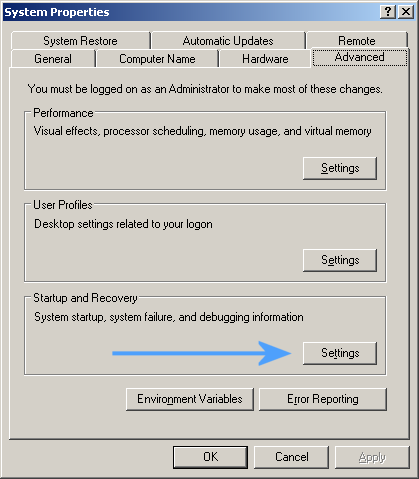
System Properties Window
- In the opened ‘Startup And Recovery’ window, there is ‘Write Debugging Information’ section. You should set the combo-box in this section to ‘Small memory dump’, and then click ‘ok’ to confirm the change.
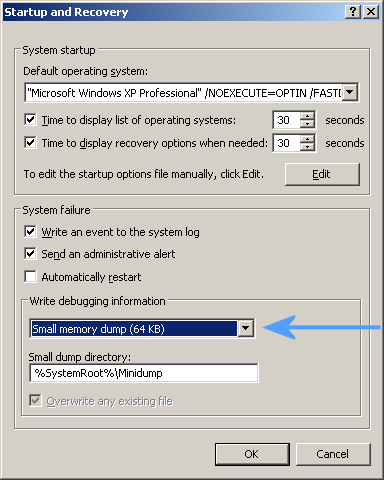
Startup And Recovery
For Windows 7:
- Go to the Control Panel, choose ‘System And Security’, and then click ‘System’, and then click the ‘Advanced System Settings’ link.
- In the opened window, click the ‘Advanced’ tab and then inside the ‘Startup And Recovery’ frame, click the ‘Settings’ button.
- In the opened ‘Startup And Recovery’ window, there is ‘Write Debugging Information’ section. You should set the combo-box in this section to ‘Small memory dump’, and then click ‘ok’ to confirm the change.
You can also make this MiniDump change in the Registry, by setting the following value:
Windows Registry Editor Version 5.00
[HKEY_LOCAL_MACHINE\SYSTEM\CurrentControlSet\Control\CrashControl]
“CrashDumpEnabled”=dword:00000003
However, be aware that this Registry change affects the system only after reboot.

Ikaragua says:
I am sorry to say this in this place, but your tools simply rock! Thanks a lot! Very much appreciated!
August 6, 2010, 6:37 amJimbo says:
I am encountering a STOP error c0000021a on both restarts and shutdowns, both related to the Winlogon process terminating. The system is not generating any Minidumps. Will the registry edit approach fix this? I have the system configured to generate Userdump files and have a set of .dmp files. Unfortunately, WinDbg isn’t telling me much.
September 9, 2010, 9:47 amRenko says:
OMG!!! Finally my usual bi-hourly BSOD is solved!!! I’m so happy now :o)
October 31, 2010, 5:27 pmHomer says:
You are a computer god!
January 31, 2011, 4:01 amEm says:
Brand new HP Pavilion dv7 with Windows 7
Random BSOD
See below for most recent one – can anyone help?
Problem Event Name: BlueScreen
OS Version: 6.1.7600.2.0.0.768.3
Locale ID: 1033
Additional information about the problem:
BCCode: 50
BCP1: FFFFF28006340D50
BCP2: 0000000000000000
BCP3: FFFFF80002CF07ED
BCP4: 0000000000000007
OS Version: 6_1_7600
Service Pack: 0_0
Product: 768_1
Files that help describe the problem:
February 12, 2011, 8:40 amC:\Windows\Minidump21111-31465-01.dmp
C:\Users\user\AppData\Local\Temp\WER-30978912-0.sysdata.xml
Mike Magers says:
I’m having the same problem – random BSOD on a 60 day old HP Pavilion dv7 with Windows 7 64bit. I thought it was a software problem so did a full system restore from the RECOVERY D: partition. Still crashing. Any ideas?
February 18, 2011, 2:41 pmFuzzilla says:
I don’t know how to thank you. Though not plagued with BSOD’s often at all, it is very frustrating to try to read the screen and then boop… the reboot comes when I’m about halfway. And we all know reading the system file is coded for MS-only decryption.
May 10, 2011, 9:45 pmRockimus-Onimus-Nirimus!!
Mick says:
Can this app open Kernel memory dumps or Complete Memory Dumps as well?
May 15, 2011, 11:15 amMurdock says:
Use Windbg to analyze the Minidump file
June 7, 2011, 5:15 amAravind says:
Hi,
June 15, 2011, 5:50 amI went to the location using regedit but how to create new value plz help me i m facing the Blue screen error
Javed says:
I get vertical strips with horizontal lines in it while system crashes and auto restarts. I don’t get bsod even after automatically restart is disabled. I could not figure it out whether it is hardware problem or software. 🙁
My system is 8 months old consist of Asus Mother, Intel i3 processor and 4gb ram.
October 16, 2011, 5:30 amLotez says:
Hi… my laptop got problems.. sometimes, when i do the start, there’s a power but no display in the screen. il do try restarting and it turn to BSOD.. im confuse what is all about this error cause sometimes it works great…even i use the recovery disk, nothing happens… same problem i got. ASUS PT3400
November 6, 2011, 6:14 amMaud says:
@Lotez. Sounds like your problem is more related to a hardware issue due to a corrupted BIOS. Try removing the battery and power adapter then press and hold the power button for at least 30 sec to clear the BIOS. Reinsert the battery, connect the power adapter, and try to reboot. If that does not solve your issue and you are adventurous, dismantle your laptop and remove the CMOS coin cell battery for at least 30 sec to clear the BIOS. Reinsert the CMOS battery and re-assemble the laptop. Again, insert the battery and power adapter and reboot. If the coin cell battery is soldered, short it by touching a conductive metal (screwdriver) across its terminals. You can find specific instructions on how to dismantle your laptop by either googling or searching Youtube. HTH
December 28, 2011, 2:21 amPhil Goetz says:
Tried that. Still no minidump recorded. No folder C:\WINDOWS\Minidump exists, despite getting a BSOD every hour or so. The system event log has no events except those for the computer starting up.
January 10, 2012, 8:11 pmPhil Goetz says:
Aha. I noticed other people who complain of not having a minidump file, like me, have their OS installed on an SSD. When you install an OS on an SSD, you don’t use a pagefile, because the page file would ruin your SSD. When you have no pagefile, you get no minidump. You will get a popup warning you that you will get no minidump in case of STOP if you try to change the “Small dump directory” location.
January 10, 2012, 8:18 pmPhil Goetz says:
That’s not right, either. I have a pagefile, but I moved it to another drive, instead of having it on my SSD. The error popup specifically says, “If the pagefile on volume C: has an initial size of less than 0 megabytes, then the system may not be able to create a debugging information file if a STOP error occurs.” Windows is on C, and the pagefile is on Z.
January 10, 2012, 8:21 pmBenjy says:
What are the settings for Vista. XP & Win7 are posted. Where is Vista info.
January 24, 2012, 1:19 pmWhy Small memory dump vs Kernel memory dump which is default on my Vista box.
Can this app open Kernel memory dumps or Complete Memory Dumps as well?
malendras says:
OK, I did that, and the C:/windows/minidump folder is there, yet there isn’t a log since mid-November. I’ve been getting BSODs, but no log whatsoever.
February 1, 2012, 11:41 pmJeff says:
Malendras, I am having the same issue with Vista home premium on gateway laptop. No dump files created after BSOD. I just updated to create small dump, and now I’ll wait for the next one to see what I get.
February 23, 2012, 1:27 amKhayrul says:
Sir, how cam i take a print screen when BSOD created. It is possible?
March 14, 2012, 4:00 amAnurag Singh says:
please help me.i am facing the bsod. and the error report is:-
Problem signature:
Problem Event Name: BlueScreen
OS Version: 6.1.7600.2.0.0.256.1
Locale ID: 1033
Additional information about the problem:
BCCode: 116
BCP1: 84E16118
BCP2: 8CC209B0
BCP3: 00000000
BCP4: 0000000C
OS Version: 6_1_7600
Service Pack: 0_0
Product: 256_1
Files that help describe the problem:
C:\Windows\Minidump31912-11715-01.dmp
C:\Users\Vijay\AppData\Local\Temp\WER-23883-0.sysdata.xml
Read our privacy statement online:
http://go.microsoft.com/fwlink/?linkid=104288&clcid=0x0409
If the online privacy statement is not available, please read our privacy statement offline:
March 19, 2012, 11:58 amC:\Windows\system32\en-US\erofflps.txt
please help me i am searchin the solution frome an year.please!!!!!
Anurag Singh says:
and renko please tell how your bsod is solved
March 19, 2012, 12:00 pmdeepu says:
i have a problem in which the screen suddenly become blue and a note written up there “whea_uncorrectable_error”then i have to shut down my computer ..detail of my computer is
March 25, 2012, 10:19 amhcl me op:windows 8 consumer preview ………..
jmjsquared says:
What? Windows crashes?!? Did anybody tell Bill?
May 11, 2012, 5:33 pmdalton says:
was playing minecraft and i did the dump smalls and it still did not work what else cani do?
May 30, 2012, 8:05 pmBrito says:
I applied the startup and recovery setting, small memory dump, and windows itself said it would make %systemroot%\minidump. I restarted the computer, but the file is nowhwere to be seen. Also memory.dmp is nowhwere.
Does anyone know what else to do to get minidumps?
July 12, 2012, 12:55 pmGreg J says:
I have the same question as Benjy [January 24th, 2012 at 1:19 pm ]
What are the settings for Vista.
[XP & Win7 are posted].
I do not see any Vista info??
I know XP & Win7 are totally different animals.
Any comments or help available?
July 12, 2012, 7:36 pmJack says:
Hi, I play a game called Tekkit. It uses Java but when i play for about 10 minutes it suddenly closes and a error message is displayed.
-ERROR MESSAGE-
#
# A fatal error has been detected by the Java Runtime Environment:
#
# EXCEPTION_ACCESS_VIOLATION (0xc0000005) at pc=0x000007fef30c6220, pid=4512, tid=5080
#
# JRE version: 7.0_06-b24
# Java VM: Java HotSpot(TM) 64-Bit Server VM (23.2-b09 mixed mode windows-amd64 compressed oops)
# Problematic frame:
# C [OpenAL64.dll+0x6220] alSourcei+0x144
#
# Failed to write core dump. Minidumps are not enabled by default on client versions of Windows
#
# If you would like to submit a bug report, please visit:
# http://bugreport.sun.com/bugreport/crash.jsp
# The crash happened outside the Java Virtual Machine in native code.
# See problematic frame for where to report the bug.
#
————— T H R E A D —————
Current thread (0x0000000014c10800): JavaThread “Thread-16” [_thread_in_native, id=5080, stack(0x00000000144a0000,0x00000000145a0000)]
siginfo: ExceptionCode=0xc0000005, writing address 0xffffffff816d9260
Registers:
RAX=0x0000000006a95310, RBX=0xffffffff816d9240, RCX=0x0000000006a90000, RDX=0x0000000000000088
RSP=0x000000001459ede0, RBP=0x0000000006a9df00, RSI=0x00000000ffffffff, RDI=0x0000000000000005
R8 =0x0000000006a95300, R9 =0x0000000006a95310, R10=0x00000000027a237c, R11=0x0000000006a9df00
R12=0x0000000006a96fe0, R13=0x00000006fd52bcc8, R14=0x000000001459eec0, R15=0x0000000014c10800
RIP=0x000007fef30c6220, EFLAGS=0x0000000000010246
Top of Stack: (sp=0x000000001459ede0)
0x000000001459ede0: ffffffff816d9240 00000000ffffffff
0x000000001459edf0: 00000006fd50d2d0 000000001459ee58
0x000000001459ee00: 0000000000000000 00000000027a23a8
0x000000001459ee10: 00000006fd52bcc8 000000001459ee90
0x000000001459ee20: 0000000000000013 0000000000000005
0x000000001459ee30: 00000000816d9240 0000000000000000
0x000000001459ee40: 0000000702df1298 00000007c35555c8
0x000000001459ee50: 000000001459ee50 0000000000000000
0x000000001459ee60: 000000001459eec0 00000006fd52ea50
0x000000001459ee70: 0000000000000000 00000006fd52bcc8
0x000000001459ee80: 0000000000000000 000000001459eeb0
0x000000001459ee90: 000000001459ef08 00000000027961f8
0x000000001459eea0: 0000000702a9d600 000000000279f1d8
0x000000001459eeb0: 00000000816d9240 0000000000001009
0x000000001459eec0: 0000000006a9df00 000000001459eec8
0x000000001459eed0: 00000006fd51cf9f 000000001459ef20
Instructions: (pc=0x000007fef30c6220)
0x000007fef30c6200: a1 00 00 83 60 08 00 48 83 60 10 00 89 18 c7 40
0x000007fef30c6210: 04 01 00 00 00 48 89 45 68 c7 45 70 01 00 00 00
0x000007fef30c6220: ff 43 20 eb 0a c7 85 74 01 00 00 30 10 00 00 89
0x000007fef30c6230: 5d 54 e9 c5 01 00 00 b9 03 a0 00 00 e9 b6 01 00
Register to memory mapping:
RAX=0x0000000006a95310 is an unknown value
RBX=0xffffffff816d9240 is an unknown value
RCX=0x0000000006a90000 is an unknown value
RDX=0x0000000000000088 is an unknown value
RSP=0x000000001459ede0 is pointing into the stack for thread: 0x0000000014c10800
RBP=0x0000000006a9df00 is an unknown value
RSI=0x00000000ffffffff is an unknown value
RDI=0x0000000000000005 is an unknown value
R8 =0x0000000006a95300 is an unknown value
R9 =0x0000000006a95310 is an unknown value
R10=0x00000000027a237c is an Interpreter codelet
method entry point (kind = native) [0x00000000027a2100, 0x00000000027a2980] 2176 bytes
R11=0x0000000006a9df00 is an unknown value
R12=0x0000000006a96fe0 is an unknown value
R13=0x00000006fd52bcc8 is an oop
{method}
– klass: {other class}
R14=0x000000001459eec0 is pointing into the stack for thread: 0x0000000014c10800
R15=0x0000000014c10800 is a thread
Stack: [0x00000000144a0000,0x00000000145a0000], sp=0x000000001459ede0, free space=1019k
Native frames: (J=compiled Java code, j=interpreted, Vv=VM code, C=native code)
C [OpenAL64.dll+0x6220] alSourcei+0x144
Java frames: (J=compiled Java code, j=interpreted, Vv=VM code)
j org.lwjgl.openal.AL10.alSourcei(III)V+0
j paulscode.sound.libraries.ChannelLWJGLOpenAL.attachBuffer(Ljava/nio/IntBuffer;)Z+39
j paulscode.sound.libraries.SourceLWJGLOpenAL.play(Lpaulscode/sound/Channel;)V+362
j paulscode.sound.Library.play(Lpaulscode/sound/Source;)V+72
j paulscode.sound.Library.play(Ljava/lang/String;)V+89
j paulscode.sound.SoundSystem.CommandPlay(Ljava/lang/String;)V+12
J paulscode.sound.SoundSystem.CommandQueue(Lpaulscode/sound/CommandObject;)Z
j paulscode.sound.CommandThread.run()V+51
v ~StubRoutines::call_stub
————— P R O C E S S —————
Java Threads: ( => current thread )
0x0000000017f64800 JavaThread “Keep-Alive-Timer” daemon [_thread_blocked, id=4644, stack(0x000000001bbc0000,0x000000001bcc0000)]
0x0000000017f63000 JavaThread “File IO Thread” [_thread_blocked, id=4436, stack(0x000000001b820000,0x000000001b920000)]
0x0000000014c0f800 JavaThread “Thread-25” [_thread_blocked, id=4408, stack(0x000000001bcf0000,0x000000001bdf0000)]
0x0000000014c11000 JavaThread “Thread-17” [_thread_blocked, id=5084, stack(0x000000001c980000,0x000000001ca80000)]
=>0x0000000014c10800 JavaThread “Thread-16” [_thread_in_native, id=5080, stack(0x00000000144a0000,0x00000000145a0000)]
0x0000000014c0a000 JavaThread “Thread-10” daemon [_thread_in_native, id=4836, stack(0x0000000028090000,0x0000000028190000)]
0x0000000014c0f000 JavaThread “Minecraft main thread” [_thread_blocked, id=4796, stack(0x0000000017dd0000,0x0000000017ed0000)]
0x0000000014c0e000 JavaThread “Timer hack thread” daemon [_thread_blocked, id=4792, stack(0x0000000017c60000,0x0000000017d60000)]
0x0000000014c0b000 JavaThread “SwingWorker-pool-1-thread-6” daemon [_thread_blocked, id=4784, stack(0x0000000016560000,0x0000000016660000)]
0x0000000014c0d800 JavaThread “SwingWorker-pool-1-thread-5” daemon [_thread_blocked, id=4760, stack(0x0000000017b10000,0x0000000017c10000)]
0x0000000014c0c800 JavaThread “Keep-Alive-SocketCleaner” daemon [_thread_blocked, id=4748, stack(0x00000000178c0000,0x00000000179c0000)]
0x0000000014c0c000 JavaThread “Image Animator 3” daemon [_thread_blocked, id=4728, stack(0x00000000179f0000,0x0000000017af0000)]
0x0000000014eaf800 JavaThread “SwingWorker-pool-1-thread-4” daemon [_thread_blocked, id=4716, stack(0x0000000017670000,0x0000000017770000)]
0x00000000020ee800 JavaThread “DestroyJavaVM” [_thread_blocked, id=4548, stack(0x0000000002460000,0x0000000002560000)]
0x0000000014a7b800 JavaThread “SwingWorker-pool-1-thread-3” daemon [_thread_blocked, id=4704, stack(0x00000000174e0000,0x00000000175e0000)]
0x0000000014f4f000 JavaThread “SwingWorker-pool-1-thread-2” daemon [_thread_blocked, id=4700, stack(0x00000000173d0000,0x00000000174d0000)]
0x0000000014949800 JavaThread “TimerQueue” daemon [_thread_blocked, id=4672, stack(0x00000000153a0000,0x00000000154a0000)]
0x0000000014b97000 JavaThread “SwingWorker-pool-1-thread-1” daemon [_thread_blocked, id=4668, stack(0x0000000012fa0000,0x00000000130a0000)]
0x0000000013474000 JavaThread “AWT-EventQueue-0” [_thread_blocked, id=4624, stack(0x0000000014650000,0x0000000014750000)]
0x00000000132d7800 JavaThread “AWT-Windows” daemon [_thread_in_native, id=4616, stack(0x0000000013a30000,0x0000000013b30000)]
0x00000000132d7000 JavaThread “AWT-Shutdown” [_thread_blocked, id=4612, stack(0x0000000013800000,0x0000000013900000)]
0x00000000132d6000 JavaThread “Java2D Disposer” daemon [_thread_blocked, id=4608, stack(0x0000000013610000,0x0000000013710000)]
0x00000000115f4000 JavaThread “Service Thread” daemon [_thread_blocked, id=4600, stack(0x00000000130c0000,0x00000000131c0000)]
0x00000000115eb800 JavaThread “C2 CompilerThread1” daemon [_thread_blocked, id=4596, stack(0x0000000012ea0000,0x0000000012fa0000)]
0x00000000115e5800 JavaThread “C2 CompilerThread0” daemon [_thread_blocked, id=4592, stack(0x0000000012c10000,0x0000000012d10000)]
0x00000000115e4800 JavaThread “Attach Listener” daemon [_thread_blocked, id=4588, stack(0x0000000012ae0000,0x0000000012be0000)]
0x00000000115dd800 JavaThread “Signal Dispatcher” daemon [_thread_blocked, id=4584, stack(0x00000000129b0000,0x0000000012ab0000)]
0x000000001155a800 JavaThread “Finalizer” daemon [_thread_blocked, id=4580, stack(0x0000000012510000,0x0000000012610000)]
0x0000000011554000 JavaThread “Reference Handler” daemon [_thread_blocked, id=4576, stack(0x00000000128a0000,0x00000000129a0000)]
Other Threads:
0x0000000011549800 VMThread [stack: 0x00000000126c0000,0x00000000127c0000] [id=4572]
0x00000000115ff000 WatcherThread [stack: 0x0000000012d60000,0x0000000012e60000] [id=4604]
VM state:not at safepoint (normal execution)
VM Mutex/Monitor currently owned by a thread: None
Heap
PSYoungGen total 772800K, used 410276K [0x00000007aaab0000, 0x00000007fba40000, 0x0000000800000000)
eden space 768064K, 52% used [0x00000007aaab0000,0x00000007c36be2e0,0x00000007d98c0000)
from space 4736K, 99% used [0x00000007db900000,0x00000007dbd9ad60,0x00000007dbda0000)
to space 279296K, 0% used [0x00000007ea980000,0x00000007ea980000,0x00000007fba40000)
ParOldGen total 380992K, used 126701K [0x0000000700000000, 0x0000000717410000, 0x00000007aaab0000)
object space 380992K, 33% used [0x0000000700000000,0x0000000707bbb6d8,0x0000000717410000)
PSPermGen total 63296K, used 44844K [0x00000006fae00000, 0x00000006febd0000, 0x0000000700000000)
object space 63296K, 70% used [0x00000006fae00000,0x00000006fd9cb1f8,0x00000006febd0000)
Card table byte_map: [0x0000000005b20000,0x0000000006350000] byte_map_base: 0x0000000002349000
Polling page: 0x0000000000330000
Code Cache [0x0000000002790000, 0x0000000002f70000, 0x0000000005790000)
total_blobs=3115 nmethods=2279 adapters=785 free_code_cache=41247Kb largest_free_block=42105792
Compilation events (10 events):
Event: 356.922 Thread 0x00000000115e5800 2393 xd::k (46 bytes)
Event: 356.925 Thread 0x00000000115e5800 nmethod 2393 0x0000000002f1ddd0 code [0x0000000002f1df40, 0x0000000002f1e248]
Event: 358.051 Thread 0x00000000115eb800 2394 java.util.ArrayList::remove (77 bytes)
Event: 358.057 Thread 0x00000000115eb800 nmethod 2394 0x0000000002f511d0 code [0x0000000002f51320, 0x0000000002f516d8]
Event: 359.172 Thread 0x00000000115e5800 2395 xd::c (52 bytes)
Event: 359.175 Thread 0x00000000115e5800 nmethod 2395 0x0000000002f50950 code [0x0000000002f50ac0, 0x0000000002f50e48]
Event: 359.973 Thread 0x00000000115eb800 2396 org.lwjgl.opengl.GLChecks::ensureUnpackPBOdisabled (24 bytes)
Event: 359.974 Thread 0x00000000115eb800 nmethod 2396 0x0000000002f02750 code [0x0000000002f028a0, 0x0000000002f02978]
Event: 361.405 Thread 0x00000000115e5800 2397 pb::a (1 bytes)
Event: 361.405 Thread 0x00000000115e5800 nmethod 2397 0x0000000002f1db10 code [0x0000000002f1dc40, 0x0000000002f1dc98]
GC Heap History (10 events):
Event: 227.702 GC heap before
{Heap before GC invocations=46 (full 9):
PSYoungGen total 1088512K, used 789312K [0x00000007aaab0000, 0x0000000800000000, 0x0000000800000000)
eden space 789312K, 100% used [0x00000007aaab0000,0x00000007dad80000,0x00000007dad80000)
from space 299200K, 0% used [0x00000007edbd0000,0x00000007edbd0000,0x0000000800000000)
to space 304384K, 0% used [0x00000007dad80000,0x00000007dad80000,0x00000007ed6c0000)
ParOldGen total 380992K, used 126701K [0x0000000700000000, 0x0000000717410000, 0x00000007aaab0000)
object space 380992K, 33% used [0x0000000700000000,0x0000000707bbb6d8,0x0000000717410000)
PSPermGen total 63296K, used 44613K [0x00000006fae00000, 0x00000006febd0000, 0x0000000700000000)
object space 63296K, 70% used [0x00000006fae00000,0x00000006fd991688,0x00000006febd0000)
Event: 227.705 GC heap after
Heap after GC invocations=46 (full 9):
PSYoungGen total 1093696K, used 3053K [0x00000007aaab0000, 0x0000000800000000, 0x0000000800000000)
eden space 789312K, 0% used [0x00000007aaab0000,0x00000007aaab0000,0x00000007dad80000)
from space 304384K, 1% used [0x00000007dad80000,0x00000007db07b610,0x00000007ed6c0000)
to space 304384K, 0% used [0x00000007ed6c0000,0x00000007ed6c0000,0x0000000800000000)
ParOldGen total 380992K, used 126701K [0x0000000700000000, 0x0000000717410000, 0x00000007aaab0000)
object space 380992K, 33% used [0x0000000700000000,0x0000000707bbb6d8,0x0000000717410000)
PSPermGen total 63296K, used 44613K [0x00000006fae00000, 0x00000006febd0000, 0x0000000700000000)
object space 63296K, 70% used [0x00000006fae00000,0x00000006fd991688,0x00000006febd0000)
}
Event: 259.087 GC heap before
{Heap before GC invocations=47 (full 9):
PSYoungGen total 1093696K, used 792365K [0x00000007aaab0000, 0x0000000800000000, 0x0000000800000000)
eden space 789312K, 100% used [0x00000007aaab0000,0x00000007dad80000,0x00000007dad80000)
from space 304384K, 1% used [0x00000007dad80000,0x00000007db07b610,0x00000007ed6c0000)
to space 304384K, 0% used [0x00000007ed6c0000,0x00000007ed6c0000,0x0000000800000000)
ParOldGen total 380992K, used 126701K [0x0000000700000000, 0x0000000717410000, 0x00000007aaab0000)
object space 380992K, 33% used [0x0000000700000000,0x0000000707bbb6d8,0x0000000717410000)
PSPermGen total 63296K, used 44633K [0x00000006fae00000, 0x00000006febd0000, 0x0000000700000000)
object space 63296K, 70% used [0x00000006fae00000,0x00000006fd9966a0,0x00000006febd0000)
Event: 259.089 GC heap after
Heap after GC invocations=47 (full 9):
PSYoungGen total 1087424K, used 3418K [0x00000007aaab0000, 0x00000007ff9e0000, 0x0000000800000000)
eden space 789312K, 0% used [0x00000007aaab0000,0x00000007aaab0000,0x00000007dad80000)
from space 298112K, 1% used [0x00000007ed6c0000,0x00000007eda16928,0x00000007ff9e0000)
to space 301248K, 0% used [0x00000007dad80000,0x00000007dad80000,0x00000007ed3b0000)
ParOldGen total 380992K, used 126701K [0x0000000700000000, 0x0000000717410000, 0x00000007aaab0000)
object space 380992K, 33% used [0x0000000700000000,0x0000000707bbb6d8,0x0000000717410000)
PSPermGen total 63296K, used 44633K [0x00000006fae00000, 0x00000006febd0000, 0x0000000700000000)
object space 63296K, 70% used [0x00000006fae00000,0x00000006fd9966a0,0x00000006febd0000)
}
Event: 293.536 GC heap before
{Heap before GC invocations=48 (full 9):
PSYoungGen total 1087424K, used 792730K [0x00000007aaab0000, 0x00000007ff9e0000, 0x0000000800000000)
eden space 789312K, 100% used [0x00000007aaab0000,0x00000007dad80000,0x00000007dad80000)
from space 298112K, 1% used [0x00000007ed6c0000,0x00000007eda16928,0x00000007ff9e0000)
to space 301248K, 0% used [0x00000007dad80000,0x00000007dad80000,0x00000007ed3b0000)
ParOldGen total 380992K, used 126701K [0x0000000700000000, 0x0000000717410000, 0x00000007aaab0000)
object space 380992K, 33% used [0x0000000700000000,0x0000000707bbb6d8,0x0000000717410000)
PSPermGen total 63296K, used 44718K [0x00000006fae00000, 0x00000006febd0000, 0x0000000700000000)
object space 63296K, 70% used [0x00000006fae00000,0x00000006fd9ab960,0x00000006febd0000)
Event: 293.539 GC heap after
Heap after GC invocations=48 (full 9):
PSYoungGen total 1090560K, used 3636K [0x00000007aaab0000, 0x00000007ff850000, 0x0000000800000000)
eden space 789312K, 0% used [0x00000007aaab0000,0x00000007aaab0000,0x00000007dad80000)
from space 301248K, 1% used [0x00000007dad80000,0x00000007db10d3c0,0x00000007ed3b0000)
to space 295744K, 0% used [0x00000007ed780000,0x00000007ed780000,0x00000007ff850000)
ParOldGen total 380992K, used 126701K [0x0000000700000000, 0x0000000717410000, 0x00000007aaab0000)
object space 380992K, 33% used [0x0000000700000000,0x0000000707bbb6d8,0x0000000717410000)
PSPermGen total 63296K, used 44718K [0x00000006fae00000, 0x00000006febd0000, 0x0000000700000000)
object space 63296K, 70% used [0x00000006fae00000,0x00000006fd9ab960,0x00000006febd0000)
}
Event: 324.309 GC heap before
{Heap before GC invocations=49 (full 9):
PSYoungGen total 1090560K, used 792948K [0x00000007aaab0000, 0x00000007ff850000, 0x0000000800000000)
eden space 789312K, 100% used [0x00000007aaab0000,0x00000007dad80000,0x00000007dad80000)
from space 301248K, 1% used [0x00000007dad80000,0x00000007db10d3c0,0x00000007ed3b0000)
to space 295744K, 0% used [0x00000007ed780000,0x00000007ed780000,0x00000007ff850000)
ParOldGen total 380992K, used 126701K [0x0000000700000000, 0x0000000717410000, 0x00000007aaab0000)
object space 380992K, 33% used [0x0000000700000000,0x0000000707bbb6d8,0x0000000717410000)
PSPermGen total 63296K, used 44786K [0x00000006fae00000, 0x00000006febd0000, 0x0000000700000000)
object space 63296K, 70% used [0x00000006fae00000,0x00000006fd9bcbe0,0x00000006febd0000)
Event: 324.313 GC heap after
Heap after GC invocations=49 (full 9):
PSYoungGen total 1084352K, used 3792K [0x00000007aaab0000, 0x00000007fec20000, 0x0000000800000000)
eden space 801088K, 0% used [0x00000007aaab0000,0x00000007aaab0000,0x00000007db900000)
from space 283264K, 1% used [0x00000007ed780000,0x00000007edb34240,0x00000007fec20000)
to space 288320K, 0% used [0x00000007db900000,0x00000007db900000,0x00000007ed290000)
ParOldGen total 380992K, used 126701K [0x0000000700000000, 0x0000000717410000, 0x00000007aaab0000)
object space 380992K, 33% used [0x0000000700000000,0x0000000707bbb6d8,0x0000000717410000)
PSPermGen total 63296K, used 44786K [0x00000006fae00000, 0x00000006febd0000, 0x0000000700000000)
object space 63296K, 70% used [0x00000006fae00000,0x00000006fd9bcbe0,0x00000006febd0000)
}
Event: 356.265 GC heap before
{Heap before GC invocations=50 (full 9):
PSYoungGen total 1084352K, used 804880K [0x00000007aaab0000, 0x00000007fec20000, 0x0000000800000000)
eden space 801088K, 100% used [0x00000007aaab0000,0x00000007db900000,0x00000007db900000)
from space 283264K, 1% used [0x00000007ed780000,0x00000007edb34240,0x00000007fec20000)
to space 288320K, 0% used [0x00000007db900000,0x00000007db900000,0x00000007ed290000)
ParOldGen total 380992K, used 126701K [0x0000000700000000, 0x0000000717410000, 0x00000007aaab0000)
object space 380992K, 33% used [0x0000000700000000,0x0000000707bbb6d8,0x0000000717410000)
PSPermGen total 63296K, used 44832K [0x00000006fae00000, 0x00000006febd0000, 0x0000000700000000)
object space 63296K, 70% used [0x00000006fae00000,0x00000006fd9c8030,0x00000006febd0000)
Event: 356.271 GC heap after
Heap after GC invocations=50 (full 9):
PSYoungGen total 772800K, used 4715K [0x00000007aaab0000, 0x00000007fba40000, 0x0000000800000000)
eden space 768064K, 0% used [0x00000007aaab0000,0x00000007aaab0000,0x00000007d98c0000)
from space 4736K, 99% used [0x00000007db900000,0x00000007dbd9ad60,0x00000007dbda0000)
to space 279296K, 0% used [0x00000007ea980000,0x00000007ea980000,0x00000007fba40000)
ParOldGen total 380992K, used 126701K [0x0000000700000000, 0x0000000717410000, 0x00000007aaab0000)
object space 380992K, 33% used [0x0000000700000000,0x0000000707bbb6d8,0x0000000717410000)
PSPermGen total 63296K, used 44832K [0x00000006fae00000, 0x00000006febd0000, 0x0000000700000000)
object space 63296K, 70% used [0x00000006fae00000,0x00000006fd9c8030,0x00000006febd0000)
}
Deoptimization events (10 events):
Event: 360.913 Thread 0x0000000017f63800 Uncommon trap -34 fr.pc 0x0000000002aec718
Event: 360.913 Thread 0x0000000017f63800 Uncommon trap -34 fr.pc 0x0000000002af06a0
Event: 360.917 Thread 0x0000000017f63800 Uncommon trap -34 fr.pc 0x0000000002d1f4c8
Event: 360.917 Thread 0x0000000017f63800 Uncommon trap -34 fr.pc 0x0000000002e21e0c
Event: 360.917 Thread 0x0000000017f63800 Uncommon trap -34 fr.pc 0x0000000002caff0c
Event: 360.917 Thread 0x0000000017f63800 Uncommon trap -34 fr.pc 0x0000000002d1f4c8
Event: 360.917 Thread 0x0000000017f63800 Uncommon trap -34 fr.pc 0x0000000002d1f4c8
Event: 360.917 Thread 0x0000000017f63800 Uncommon trap -34 fr.pc 0x0000000002e21e0c
Event: 360.917 Thread 0x0000000017f63800 Uncommon trap -34 fr.pc 0x0000000002caff0c
Event: 360.917 Thread 0x0000000017f63800 Uncommon trap -34 fr.pc 0x0000000002d1f060
Internal exceptions (10 events):
Event: 364.934 Thread 0x0000000014c10800 Threw 0x00000007b9274db8 at C:\jdk7u2_64p\jdk7u6\hotspot\src\share\vm\prims\jvm.cpp:2846
Event: 364.987 Thread 0x0000000014c10800 Threw 0x00000007b9274f28 at C:\jdk7u2_64p\jdk7u6\hotspot\src\share\vm\prims\jvm.cpp:2888
Event: 365.035 Thread 0x0000000014c10800 Threw 0x00000007b9275098 at C:\jdk7u2_64p\jdk7u6\hotspot\src\share\vm\prims\jvm.cpp:2888
Event: 365.083 Thread 0x0000000014c10800 Threw 0x00000007b9275208 at C:\jdk7u2_64p\jdk7u6\hotspot\src\share\vm\prims\jvm.cpp:2888
Event: 365.132 Thread 0x0000000014c10800 Threw 0x00000007b9275378 at C:\jdk7u2_64p\jdk7u6\hotspot\src\share\vm\prims\jvm.cpp:2888
Event: 365.181 Thread 0x0000000014c10800 Threw 0x00000007b92754e8 at C:\jdk7u2_64p\jdk7u6\hotspot\src\share\vm\prims\jvm.cpp:2888
Event: 365.229 Thread 0x0000000014c10800 Threw 0x00000007b9275658 at C:\jdk7u2_64p\jdk7u6\hotspot\src\share\vm\prims\jvm.cpp:2888
Event: 365.276 Thread 0x0000000014c10800 Threw 0x00000007b92757c8 at C:\jdk7u2_64p\jdk7u6\hotspot\src\share\vm\prims\jvm.cpp:2888
Event: 365.276 Thread 0x0000000014c10800 Threw 0x00000007b9276490 at C:\jdk7u2_64p\jdk7u6\hotspot\src\share\vm\prims\jvm.cpp:2888
Event: 365.324 Thread 0x0000000014c10800 Threw 0x00000007b9276600 at C:\jdk7u2_64p\jdk7u6\hotspot\src\share\vm\prims\jvm.cpp:2888
Events (10 events):
Event: 361.032 Executing VM operation: RevokeBias
Event: 361.033 Executing VM operation: RevokeBias done
Event: 361.033 Thread 0x0000000017f64800 Thread added: 0x0000000017f64800
Event: 361.034 Executing VM operation: RevokeBias
Event: 361.034 Executing VM operation: RevokeBias done
Event: 361.034 Thread 0x0000000017f64800 Thread exited: 0x0000000017f64800
Event: 361.158 Thread 0x0000000017f64800 Thread added: 0x0000000017f64800
Event: 361.158 Executing VM operation: RevokeBias
Event: 361.158 Executing VM operation: RevokeBias done
Event: 361.158 Thread 0x0000000017f63800 Thread exited: 0x0000000017f63800
Dynamic libraries:
0x000000013fc50000 – 0x000000013fc83000 C:\Program Files\Java\jre7\bin\java.exe
0x0000000076e00000 – 0x0000000076fa9000 C:\Windows\SYSTEM32\ntdll.dll
0x0000000076720000 – 0x000000007683f000 C:\Windows\system32\kernel32.dll
0x000007fefd5c0000 – 0x000007fefd62c000 C:\Windows\system32\KERNELBASE.dll
0x000007fefebf0000 – 0x000007fefeccb000 C:\Windows\system32\ADVAPI32.dll
0x000007fefe990000 – 0x000007fefea2f000 C:\Windows\system32\msvcrt.dll
0x000007fefecd0000 – 0x000007fefecef000 C:\Windows\SYSTEM32\sechost.dll
0x000007fefe740000 – 0x000007fefe86d000 C:\Windows\system32\RPCRT4.dll
0x0000000076af0000 – 0x0000000076bea000 C:\Windows\system32\USER32.dll
0x000007fefed90000 – 0x000007fefedf7000 C:\Windows\system32\GDI32.dll
0x000007fefe950000 – 0x000007fefe95e000 C:\Windows\system32\LPK.dll
0x000007fefeb20000 – 0x000007fefebe9000 C:\Windows\system32\USP10.dll
0x000007fefbd30000 – 0x000007fefbf24000 C:\Windows\WinSxS\amd64_microsoft.windows.common-controls_6595b64144ccf1df_6.0.7601.17514_none_fa396087175ac9ac\COMCTL32.dll
0x000007fefd6d0000 – 0x000007fefd741000 C:\Windows\system32\SHLWAPI.dll
0x000007fefe960000 – 0x000007fefe98e000 C:\Windows\system32\IMM32.DLL
0x000007fefefe0000 – 0x000007feff0e9000 C:\Windows\system32\MSCTF.dll
0x000000006c920000 – 0x000000006c9f1000 C:\Program Files\Java\jre7\bin\msvcr100.dll
0x000000006c200000 – 0x000000006c91f000 C:\Program Files\Java\jre7\bin\server\jvm.dll
0x000007fef4bf0000 – 0x000007fef4bf9000 C:\Windows\system32\WSOCK32.dll
0x000007fefd750000 – 0x000007fefd79d000 C:\Windows\system32\WS2_32.dll
0x000007fefeb10000 – 0x000007fefeb18000 C:\Windows\system32\NSI.dll
0x000007fefba30000 – 0x000007fefba6b000 C:\Windows\system32\WINMM.dll
0x0000000076fc0000 – 0x0000000076fc7000 C:\Windows\system32\PSAPI.DLL
0x00000000724c0000 – 0x00000000724ff000 C:\Program Files\Java\jre7\bin\splashscreen.dll
0x000007fefb900000 – 0x000007fefb956000 C:\Windows\system32\uxtheme.dll
0x00000000724b0000 – 0x00000000724bf000 C:\Program Files\Java\jre7\bin\verify.dll
0x0000000072480000 – 0x00000000724a8000 C:\Program Files\Java\jre7\bin\java.dll
0x000007fefd7a0000 – 0x000007fefd9a3000 C:\Windows\system32\ole32.dll
0x000007fefd190000 – 0x000007fefd19f000 C:\Windows\system32\CRYPTBASE.dll
0x000000006c1e0000 – 0x000000006c1f5000 C:\Program Files\Java\jre7\bin\zip.dll
0x000000006bea0000 – 0x000000006c033000 C:\Program Files\Java\jre7\bin\awt.dll
0x000007fefe870000 – 0x000007fefe947000 C:\Windows\system32\OLEAUT32.dll
0x000007fefb840000 – 0x000007fefb858000 C:\Windows\system32\DWMAPI.DLL
0x000007fefd9b0000 – 0x000007fefe738000 C:\Windows\system32\SHELL32.dll
0x000000006c1d0000 – 0x000000006c1db000 C:\Program Files\Java\jre7\bin\management.dll
0x000000006c190000 – 0x000000006c1c4000 C:\Program Files\Java\jre7\bin\fontmanager.dll
0x000000006c170000 – 0x000000006c189000 C:\Program Files\Java\jre7\bin\net.dll
0x000007fefcad0000 – 0x000007fefcb25000 C:\Windows\system32\mswsock.dll
0x000007fefcac0000 – 0x000007fefcac7000 C:\Windows\System32\wship6.dll
0x000000006c150000 – 0x000000006c161000 C:\Program Files\Java\jre7\bin\nio.dll
0x000000006c100000 – 0x000000006c141000 C:\Program Files\Java\jre7\bin\t2k.dll
0x000007fefc490000 – 0x000007fefc497000 C:\Windows\System32\wshtcpip.dll
0x000007fefc8f0000 – 0x000007fefc94b000 C:\Windows\system32\DNSAPI.dll
0x000007fefaf70000 – 0x000007fefaf97000 C:\Windows\system32\IPHLPAPI.DLL
0x000007fefaf50000 – 0x000007fefaf5b000 C:\Windows\system32\WINNSI.DLL
0x000007fef9de0000 – 0x000007fef9de8000 C:\Windows\system32\rasadhlp.dll
0x000007fefad30000 – 0x000007fefad83000 C:\Windows\System32\fwpuclnt.dll
0x000007fefcd20000 – 0x000007fefcd37000 C:\Windows\system32\CRYPTSP.dll
0x000007fefc800000 – 0x000007fefc847000 C:\Windows\system32\rsaenh.dll
0x000007fefc5a0000 – 0x000007fefc5be000 C:\Windows\system32\USERENV.dll
0x000007fefd260000 – 0x000007fefd26f000 C:\Windows\system32\profapi.dll
0x000007fefb230000 – 0x000007fefb245000 C:\Windows\system32\NLAapi.dll
0x000007fef5880000 – 0x000007fef5895000 C:\Windows\system32\napinsp.dll
0x000007fef5860000 – 0x000007fef5879000 C:\Windows\system32\pnrpnsp.dll
0x000007fef70a0000 – 0x000007fef70ab000 C:\Windows\System32\winrnr.dll
0x000000006c0d0000 – 0x000000006c0f4000 C:\Program Files\Java\jre7\bin\sunec.dll
0x000007fefecf0000 – 0x000007fefed89000 C:\Windows\system32\CLBCatQ.DLL
0x000007fefb370000 – 0x000007fefb49a000 C:\Windows\system32\WindowsCodecs.dll
0x000007fefd130000 – 0x000007fefd187000 C:\Windows\system32\apphelp.dll
0x000007fef8810000 – 0x000007fef8845000 C:\Windows\system32\EhStorShell.dll
0x000007fefee00000 – 0x000007fefefd7000 C:\Windows\system32\SETUPAPI.dll
0x000007fefd480000 – 0x000007fefd4b6000 C:\Windows\system32\CFGMGR32.dll
0x000007fefd4c0000 – 0x000007fefd4da000 C:\Windows\system32\DEVOBJ.dll
0x000007fefbad0000 – 0x000007fefbbfc000 C:\Windows\system32\PROPSYS.dll
0x000007fef8790000 – 0x000007fef8810000 C:\Windows\system32\ntshrui.dll
0x000007fefcdd0000 – 0x000007fefcdf3000 C:\Windows\system32\srvcli.dll
0x000007fef8860000 – 0x000007fef886f000 C:\Windows\system32\cscapi.dll
0x000007fefb1d0000 – 0x000007fefb1db000 C:\Windows\system32\slc.dll
0x000000006c0a0000 – 0x000000006c0ca000 C:\Program Files\Java\jre7\bin\dcpr.dll
0x000000006c070000 – 0x000000006c0a0000 C:\Program Files\Java\jre7\bin\jpeg.dll
0x000000006c060000 – 0x000000006c06b000 C:\Program Files\Java\jre7\bin\sunmscapi.dll
0x000007fefd310000 – 0x000007fefd47a000 C:\Windows\system32\CRYPT32.dll
0x000007fefd300000 – 0x000007fefd30f000 C:\Windows\system32\MSASN1.dll
0x0000000180000000 – 0x0000000180048000 C:\Users\Jack\AppData\Roaming\.techniclauncher\tekkit\bin\natives\lwjgl64.dll
0x000007fef3370000 – 0x000007fef348d000 C:\Windows\system32\OPENGL32.dll
0x000007fef3340000 – 0x000007fef336d000 C:\Windows\system32\GLU32.dll
0x000007fef3240000 – 0x000007fef3331000 C:\Windows\system32\DDRAW.dll
0x000007fef3230000 – 0x000007fef3238000 C:\Windows\system32\DCIMAN32.dll
0x000007fefc3c0000 – 0x000007fefc3cc000 C:\Windows\system32\VERSION.dll
0x000000006c050000 – 0x000000006c057000 C:\Program Files\Java\jre7\bin\jawt.dll
0x0000000018ea0000 – 0x000000001a00a000 C:\Windows\system32\ig4icd64.dll
0x00000000026b0000 – 0x00000000026c6000 C:\Users\Jack\AppData\Roaming\.techniclauncher\tekkit\bin\natives\jinput-dx8_64.dll
0x000007fef31f0000 – 0x000007fef322c000 C:\Windows\system32\DINPUT8.dll
0x000007fefb860000 – 0x000007fefb86b000 C:\Windows\system32\HID.DLL
0x000007fefd4e0000 – 0x000007fefd51a000 C:\Windows\system32\WINTRUST.dll
0x00000000026f0000 – 0x0000000002704000 C:\Users\Jack\AppData\Roaming\.techniclauncher\tekkit\bin\natives\jinput-raw_64.dll
0x000007fef30c0000 – 0x000007fef31e2000 C:\Users\Jack\AppData\Roaming\.techniclauncher\tekkit\bin\natives\OpenAL64.dll
0x000007fefb960000 – 0x000007fefb9e8000 C:\Windows\system32\dsound.dll
0x000007fefbc50000 – 0x000007fefbc7c000 C:\Windows\system32\POWRPROF.dll
0x000007fefbc00000 – 0x000007fefbc4b000 C:\Windows\System32\MMDevApi.dll
0x000007fef7060000 – 0x000007fef709b000 C:\Windows\system32\wdmaud.drv
0x0000000074590000 – 0x0000000074596000 C:\Windows\system32\ksuser.dll
0x000007fefba20000 – 0x000007fefba29000 C:\Windows\system32\AVRT.dll
0x000007fefb320000 – 0x000007fefb36f000 C:\Windows\system32\AUDIOSES.DLL
0x000007fef6f40000 – 0x000007fef6f4a000 C:\Windows\system32\msacm32.drv
0x000007fef6f00000 – 0x000007fef6f18000 C:\Windows\system32\MSACM32.dll
0x000007fef6ef0000 – 0x000007fef6ef9000 C:\Windows\system32\midimap.dll
0x000007fefa150000 – 0x000007fefa275000 C:\Windows\system32\dbghelp.dll
VM Arguments:
jvm_args: -Xmx4096m
java_command: C:/Users/Jack/AppData/Roaming/.techniclauncher/technic-launcher.jar
Launcher Type: SUN_STANDARD
Environment Variables:
CLASSPATH=.;C:\Program Files (x86)\Java\jre7\lib\ext\QTJava.zip
PATH=C:\Windows\system32;C:\Windows;C:\Windows\System32\Wbem;C:\Windows\System32\WindowsPowerShell\v1.0\;C:\Program Files (x86)\Intel\OpenCL SDK\2.0\bin\x86;C:\Program Files (x86)\Intel\OpenCL SDK\2.0\bin\x64;C:\Program Files (x86)\QuickTime\QTSystem\
USERNAME=Jack
OS=Windows_NT
PROCESSOR_IDENTIFIER=Intel64 Family 6 Model 42 Stepping 7, GenuineIntel
————— S Y S T E M —————
OS: Windows 7 , 64 bit Build 7601 Service Pack 1
CPU:total 4 (4 cores per cpu, 1 threads per core) family 6 model 42 stepping 7, cmov, cx8, fxsr, mmx, sse, sse2, sse3, ssse3, sse4.1, sse4.2, popcnt, avx, tsc, tscinvbit
Memory: 4k page, physical 8271884k(3224060k free), swap 16541916k(11274944k free)
vm_info: Java HotSpot(TM) 64-Bit Server VM (23.2-b09) for windows-amd64 JRE (1.7.0_06-b24), built on Aug 9 2012 20:44:07 by “java_re” with unknown MS VC++:1600
time: Sun Aug 26 23:50:21 2012
elapsed time: 365 seconds
-END OF ERROR MESSAGE-
Can someone help 🙂
August 26, 2012, 6:57 pmsmiles says:
i kneel at your feet sir ! i have had grief with my computer windows 7 64 for several months with random bsods i bought new ram trying to fix the problem to no avail i spent hundreds of hours trying to figure out the mindless drivel google provided me with, i was about to throw it through the window of the shop i purchased it from ,then i found you =) once i read your posts and followed your instructions my computer responded positively! THANK YOU SO MUCH !! one whole week has passed now and not a glitch VERY VERY HAPPY =) you rock kind regards guy nz
October 9, 2012, 9:00 pmEustace says:
I have a problem in which the screen suddenly become blue screen and a dailoge box appear. In that
“Additional information about the problem:
BCCode: 1000008e
BCP1: C0000005
BCP2: 82969795
BCP3: 98AD37CC
BCP4: 00000000
OS Version: 6_1_7600
Service Pack: 0_0
Product: 256_1
Files that help describe the problem:
C:\Windows\Minidump10213-31278-01.dmp
C:\Users\Eustace\AppData\Local\Temp\WER-127359-0.sysdata.xml
”
Please give me a solution to this problem.
January 2, 2013, 5:28 amGetta Live says:
I’ve been getting random BSODs for a few months and googled everything possible to find a solution. I tried your program and although it’s very complicated for me as a lay-person to figure out all info, I could gather it was a problem with a driver which I re-installed. …… well now after no BSODs for a month (THANK YOU)…. I got my first one and went to look for the mini dump info and there is none- the BlueScreenView screen is totally empty and there is no trace of the mini-dump file in my computer for the recent BSOD. ……… in fact- no trace of ANY of the previous mini-dump files in any folder ANYWHERE on my computer!!! The Default folder is totally empty too… Is there some kind of trick to accessing them? (at least the most recent one from my BSOD today)…. I fear I need to solve this BSOD problem soon before this laptop bites the dust…. I appreciate your tips and feedback…..
January 14, 2013, 10:28 amVano says:
My minecraft told me to enable minidumps but your way doesn’t work!
March 4, 2013, 11:24 pmmuhammad nazrel says:
please help me. . .my laptop always dead. .
Problem signature:
Problem Event Name: BlueScreen
OS Version: 6.1.7601.2.1.0.256.1
Locale ID: 17417
Additional information about the problem:
BCCode: 124
BCP1: 00000000
BCP2: 85ED8594
BCP3: 00000000
BCP4: 00000000
OS Version: 6_1_7601
Service Pack: 1_0
Product: 256_1
Files that help describe the problem:
C:\Windows\Minidump33013-54132-01.dmp
C:\Users\User\AppData\Local\Temp\WER-70543-0.sysdata.xml
Read our privacy statement online:
http://go.microsoft.com/fwlink/?linkid=104288&clcid=0x0409
If the online privacy statement is not available, please read our privacy statement offline:
March 29, 2013, 10:22 pmC:\Windows\system32\en-US\erofflps.txt
Harry Ward says:
Back on Jan 12, 2012, Phil Goetz said:
**********************
Aha. I noticed other people who complain of not having a minidump file, like me, have their OS installed on an SSD. When you install an OS on an SSD, you don’t use a pagefile, because the page file would ruin your SSD. When you have no pagefile, you get no minidump. You will get a popup warning you that you will get no minidump in case of STOP if you try to change the “Small dump directory” location.
That’s not right, either. I have a pagefile, but I moved it to another drive, instead of having it on my SSD. The error popup specifically says, “If the pagefile on volume C: has an initial size of less than 0 megabytes, then the system may not be able to create a debugging information file if a STOP error occurs.” Windows is on C, and the pagefile is on Z.
****************************
I have BlueScreenView on my XP computer, and it has saved me several times. How I have a new Win 7 Pro (64 bit) unit with a SSD with C: on it. I also have a conventional D: hard drive
How do I create the pagefile of at least 1 MB on my D: drive, so I can then run BlueScreenView?
Thanks, Harry
June 5, 2014, 4:40 pmHunter says:
how can I do this with windows 7? my son cant get minecraft to open because it says minidumps are disabled.
November 23, 2014, 2:39 pmRandomye says:
I cannot acces the startup and recovery tab it says i am not logged onto windows as a member of the users group that has the right to view the workstation’s recovery setting, how do i change that?
December 28, 2014, 2:07 amFire says:
I get a minidump file but i cannot open it. The size of the file is 290K. The Viewbluescreen program do not see it by default. I need to choose VIEW ALL FILE to see the file and if i choose OPEN IT, windows 7 answer that i do not have the right.
May you help please!
October 23, 2016, 5:54 pmKay D says:
I’m experiencing the same blue screen and your directions are like Chinese very hard to follow so I’m even more frustrated . I don’t know how certain people are getting it and I happen to be quite ok in computers and can handle instructions very but none of this working I also don’t have another pic nor can I even get in my computer pass the black screen..What to do???!!!
May 22, 2017, 8:27 pmYogha says:
Thank you very much, my blue screen problem is resolved
June 27, 2017, 5:07 am