SecurityQuestionsView is a tool for Windows 10 that allows you to view the security questions and their answers stored in the Registry by Windows 10 operating system.
You can use this tool to extract the security questions from your current running system (Requires elevation) or to extract the security questions from external disk plugged to your computer.
SecurityQuestionsView displays the security questions of all users on your system that chose to set their security questions, for every user there are usually 3 questions.
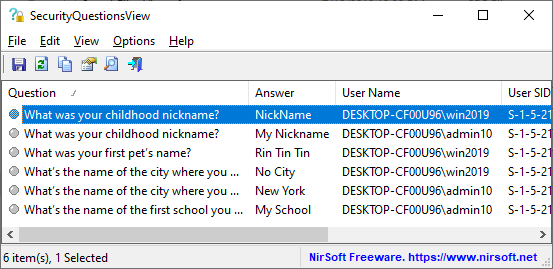
You can download the SecurityQuestionsView tool from this Web page.
Posted by NirSoft on June 4, 2020 at 3:39 am under Utilities Update.
2 Comments.
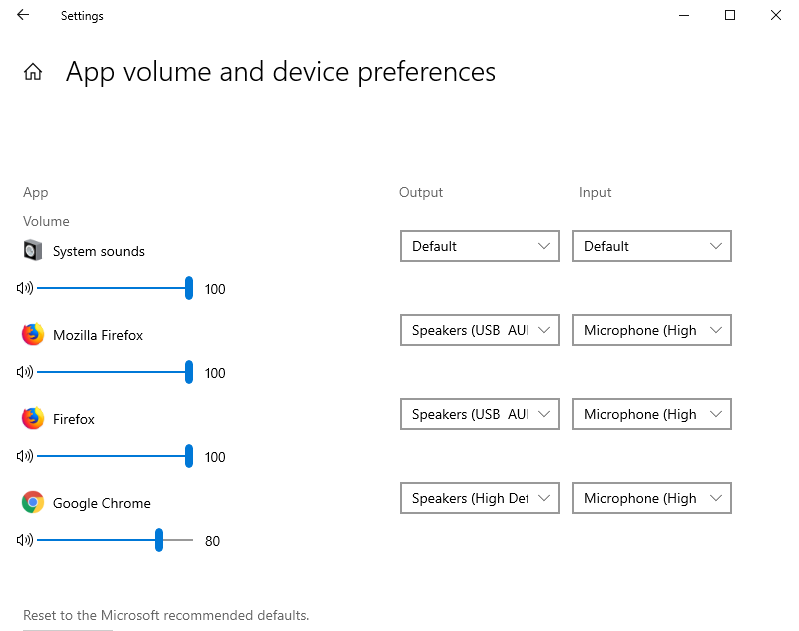
Starting from April 2018 Update of Windows 10 (Version 1803), you are allowed to set the default audio device for every application separately.
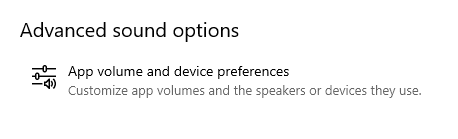
You can do it by clicking the ‘App volume and device preferences’ button inside the ‘Sound settings’ window.
Inside the ‘App volume and device preferences’ window, you can choose the default input device and output device for every sound application currently running on your system:
The new version of SoundVolumeView (2.10) allows you to do the same thing from command line, without displaying any user interface.
The command that sets the default audio device of specific application is /SetAppDefault .
This command accepts 3 parameters: The device name, the device role (0 – Console, 1 – Multimedia, 2 – Communications), name or ID of the process.
For example, the following command sets the default output device of Firefox to “High Definition Audio Device\Device\Speakers\Render” :
SoundVolumeView.exe /SetAppDefault “High Definition Audio Device\Device\Speakers\Render” 0 “Firefox.exe”
The following command sets the default input device of process that its ID is 6380 to the desired Microphone device:
SoundVolumeView.exe /SetAppDefault “Realtek High Definition Audio\Device\Microphone\Capture” 0 6380
You can download the new version of SoundVolumeView from this Web page.
Posted by NirSoft on May 29, 2020 at 1:28 am under Utilities Update.
4 Comments.
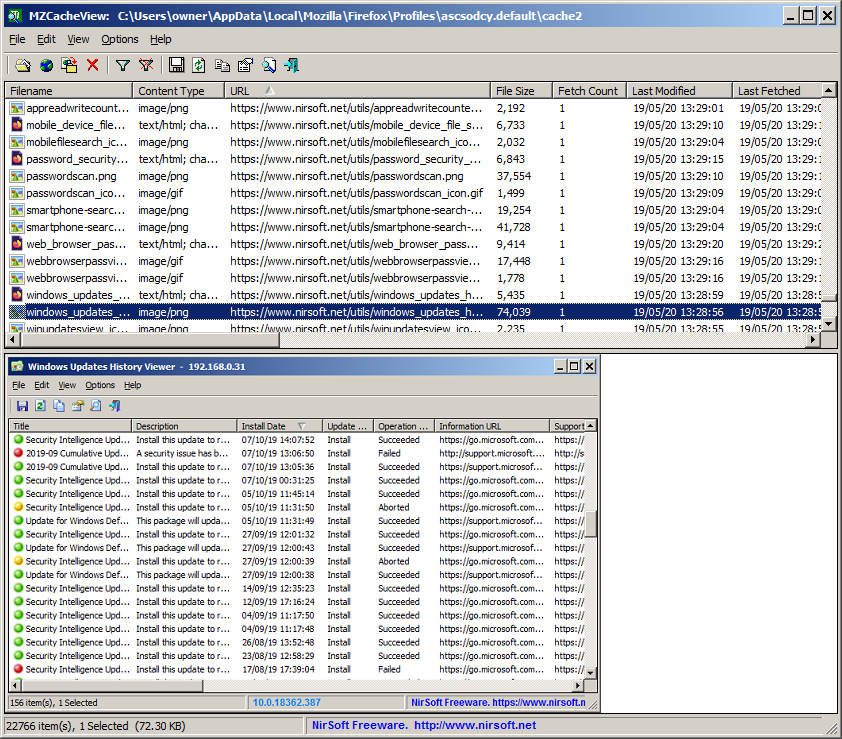
The new version of the MZCacheView tool (2.00) has a preview pane that allows you to quickly view the images (gif, png, jpg) and text-based files (HTML, CSS, JSON, JavaScript) stored in the cache of Firefox Web browser.
In order to activate this feature, simply go to the View menu and choose the ‘Show Preview Pane’ option or press the F8 key. After the preview pane is enabled, you can select the desired cache item in the upper pane and the content of the selected cache item will be displayed in the lower pane:
You can download the new version of MZCacheView from this Web page.
Posted by NirSoft on May 20, 2020 at 4:15 am under Utilities Update.
Comment on this post.
The new version of ShellBagsView tool (1.25) allows you to easily set the view mode (Tiles, Details, Content, List, Small Icons, Medium Icons, Large Icons) of multiple Windows Explorer folders at once.
In order to change the view mode, simply select the desired folders on the main window of ShellBagsView and then go to the ‘Set Mode’ menu (Under the File menu or in the context menu) and choose the desired view mode.
In the example below, the 12 selected folders are set to ‘Medium Icons’ view mode.
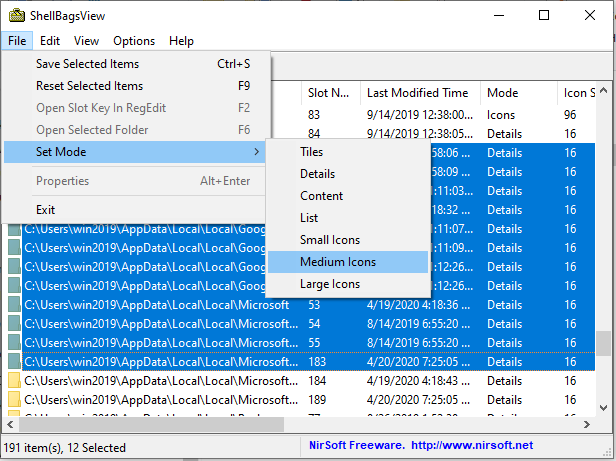
After choosing the desired mode from the Set Mode menu , ShellBagsView tool changes the view mode in all selected folders and then when you open one of these folders in Windows Explorer, it will be displayed in the view mode you selected:
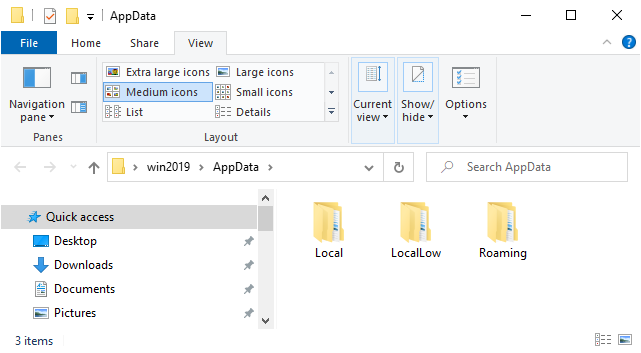
You can download the new version of ShellBagsView from this Web page.
Posted by NirSoft on April 25, 2020 at 8:35 am under Utilities Update.
3 Comments.
The new version of ChromeCacheView tool has a preview pane that allows you to instantly view the content of images (.png, .gif, .jpg) and text-based files (.html, .xml, JSON, Javascript) stored in the cache of Chrome Web browser, or any other Chromium based web browser, like Edge, Opera, Vivaldi, and so on…
In order to activate the new preview pane, simply choose the ‘Show Preview Pane’ option from the view menu or press the F8 key. After the preview pane is enabled, you can select the desired cache item in the upper pane and ChromeCacheView will display the content of the cache item in the lower preview pane.
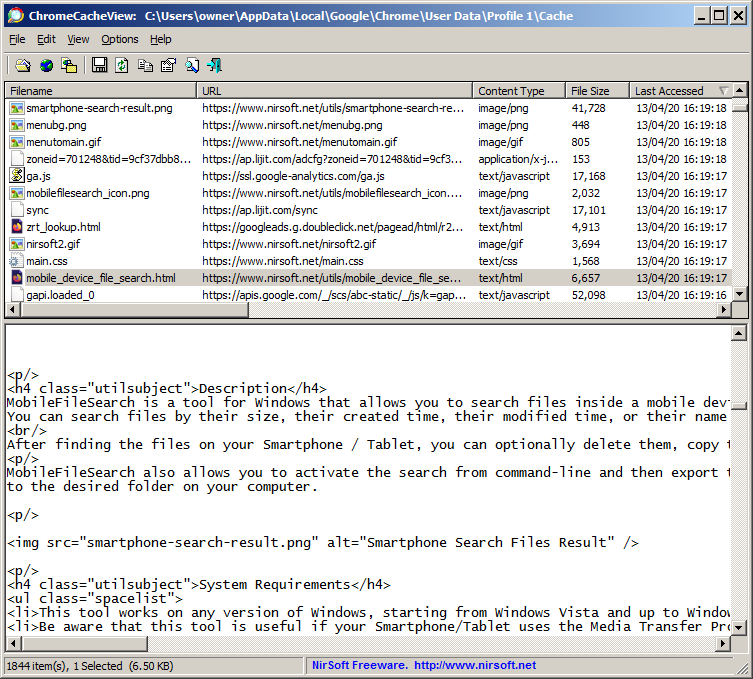
You can download the new version of ChromeCacheView from this Web page.
Posted by NirSoft on April 15, 2020 at 3:18 am under Utilities Update.
1 Comment.
WinDefThreatsView is a new tool for Windows 10 that displays the list of all threats detected by Windows Defender Antivirus. For every threat, the following information is displayed: Filename, Threat Name, Severity, Process Name, Initial Detect Time, Status Change Time, Remediation Time, Threat ID, Threat Status, Default Threat Action, and more…
WinDefThreatsView also allows you to quickly set the default action (Allow, Quarantine, Clean, Remove, Block, or No Action) for multiple threats at once. You can use this tool on your local computer and you can also get the threats list from a remote computer on your network.
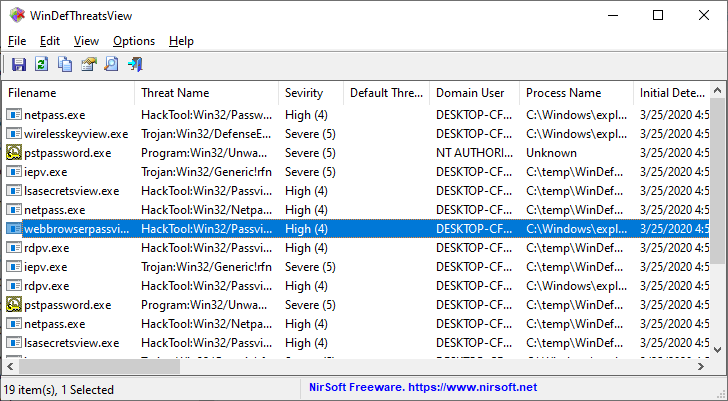
You can download the WinDefThreatsView tool from this Web page.
Posted by NirSoft on March 29, 2020 at 1:25 am under Utilities Update.
4 Comments.
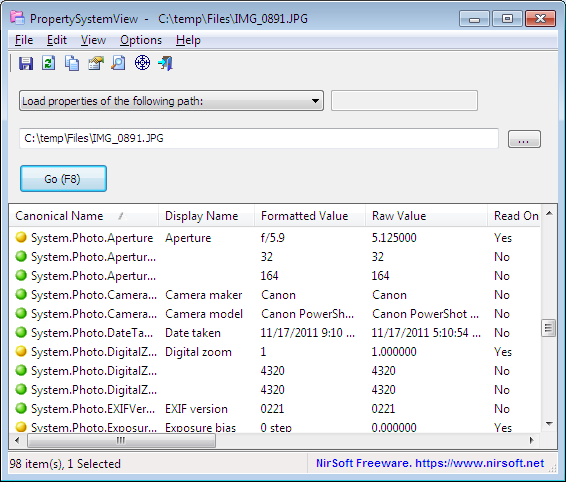
The new version of PropertySystemView tool (Version 1.05) allows you to easily view the properties of file directly from Windows Explorer.
In order to use this feature, run PropertySystemView.exe, go to the Options menu and then select then ‘Explorer Context Menu’ option:
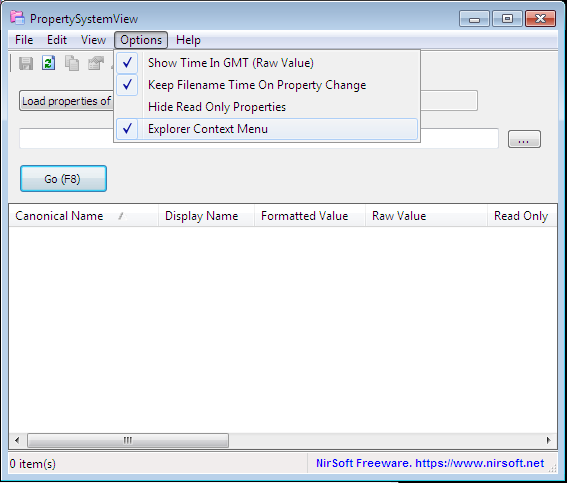
After the ‘Explorer Context Menu’ option is selected, you can right click on any file in Windows Explorer and then choose the ‘PropertySystemView’ menu item:
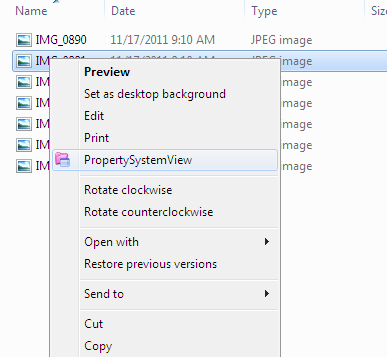
After you choose the ‘PropertySystemView’ menu item, the PropertySystemView window is opened with the selected file:
Posted by NirSoft on March 19, 2020 at 11:57 am under Utilities Update.
Comment on this post.
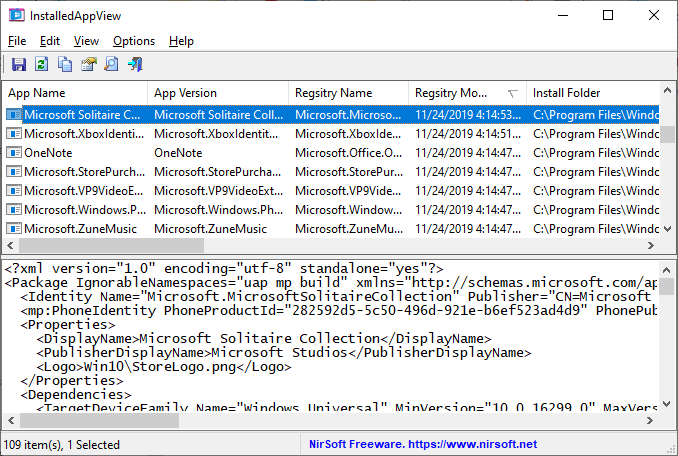
InstalledAppView is a new tool that displays the list of Windows 10 apps installed on your system. InstalledAppView displays the App name, App version, Registry Name, Registry Modified Time, Install Folder, Uninstall Command, and more. You can view the installed apps on your local machine, on remote network computer , and on external disk plugged to your computer.
InstalledAppView also allows you to open the install folder in Windows Explorer, view the AppxManifest.xml and AppxBlockMap.xml files, uninstall apps, and more.
You can download this new tool from this Web page.
Posted by NirSoft on March 10, 2020 at 3:55 pm under Utilities Update.
1 Comment.
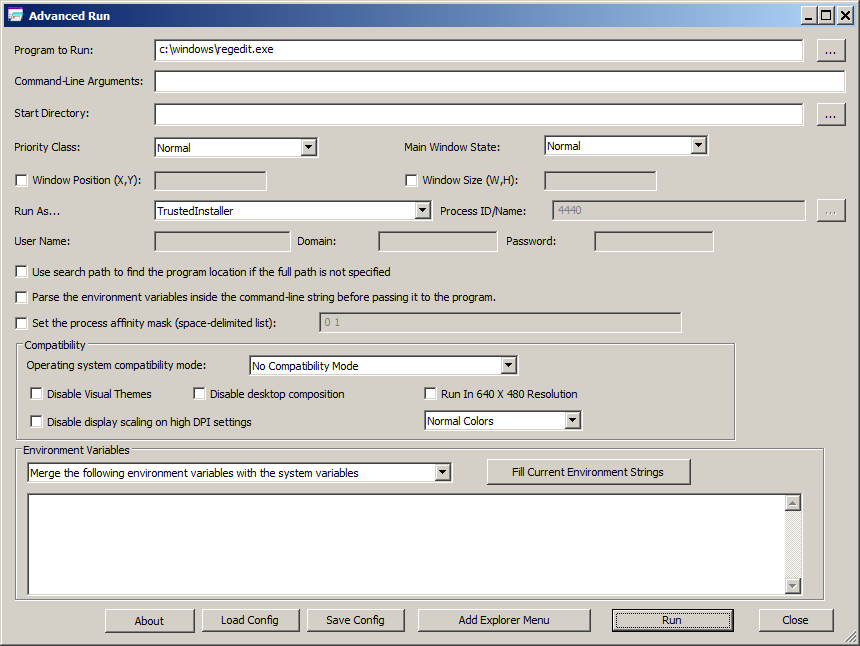
Starting from version 1.20 of AdvancedRun tool, you can easily run a program as TrustedInstaller. In order to do it, simply select ‘TrustedInstaller’ in the ‘Run As’ Combo-Box and then press the Run button.
You can also run a program as TrustedInstaller from command-line, by specifying /RunAs 8 in the run command. For example, the following command will execute RegEdit of Windows as TrustedInstaller:
AdvancedRun.exe /EXEFilename “c:\windows\regedit.exe” /RunAs 8 /Run
You can download the new version of AdvancedRun tool from this Web page.
Posted by NirSoft on February 25, 2020 at 12:10 pm under Utilities Update.
7 Comments.
Starting from version 80 of Chrome and other Chromium-based web browsers, the cookies and Web site passwords stored by the Web browser are encrypted in completely different way.
In previous versions, the cookies and passwords were encrypted by using the DPAPI encryption system of Windows.
In the new version of Chrome/Chromium, cookies and passwords are encrypted using the AES256-GCM algorithm, and the AES encryption key is encrypted with the DPAPI encryption system, and the encrypted key is stored inside the ‘Local State’ file.
This change caused all NirSoft tools related to passwords and cookies of Chromium-based web browsers to stop working properly, and update of these tools is needed in order to extract the cookies and passwords stored with the new encryption.
2 of these tools, ChromePass and ChromeCookiesView are already updated to decrypt the new encryption of Chrome. Other tools will also be updated in the near future.
Posted by NirSoft on February 19, 2020 at 4:18 pm under Utilities Update.
1 Comment.
